
Comprehensive Guide to PCB Test Jig Design and Implementation

Updated: Aug 4, 2025
Introduction
Reliable PCB testing is crucial for producing quality electronics. We understand designing your test jig might seem complicated, but we’re here to help. With our experience, we've created this guide to walk you through practical steps, useful insights, and common challenges you might face. Whether you are a seasoned engineer or just starting, this guide will provide detailed, practical information to help you successfully create a test jig that meets your specific needs. Throughout this guide, we share important insights gained from our hands-on experience, ensuring that you can avoid common mistakes and achieve efficient, reliable results.

Building Your First PCB Test Jig – Practical Steps and Lessons Learned
Getting Started
When we built our first PCB jig, we encountered challenges such as unclear CAD guidelines and unexpected pogo pin issues. Drawing from these experiences, we aim to simplify the process and help you avoid similar problems. Each step provided here is based on actual scenarios we've encountered, designed to help you navigate the complexities involved in building your test jig.
Step-by-Step Process
1. Planning and Design
Mark all test points clearly on your product's PCBA to avoid confusion later.
Consider mechanical and electrical requirements to guide your decisions.
Create a detailed design checklist to ensure nothing is overlooked.
2. Choosing the Right Materials
Durable materials like acrylic or aluminium often work best.
Select pogo pins based on their force, travel distance, and diameter, taking into account your specific needs.
Evaluate material properties such as wear resistance, conductivity, and ease of machining.
3. CAD Design Essentials
Create Gerber file overlays that are clear and precise to prevent alignment issues.
Design your jig base to allow room for adjustments; flexibility here will save you time.
Add alignment holes into your PCBA that would be used explicitly for the test jig alignment.
Verify your CAD drawings of the jig fixture versus the PCBA using the alignment holes and test points that the pogo pins would connect.
4. Fabrication: CNC, Acrylic, Aluminium or 3D Printing?
CNC machining offers precision but requires more planning.
3D printing is faster for prototypes but less precise.
Acrylic is widely available and surprisingly robust
Aluminium is great for test jigs that will be used for a long time and 100K+ units
We begin by using 3D printing to verify the design and alignment. Once it's verified, we shift to an acrylic design.
Once production has started, more jigs will be needed - this is where you can shift to aluminium or CNC, depending on the number of units you expect to produce.
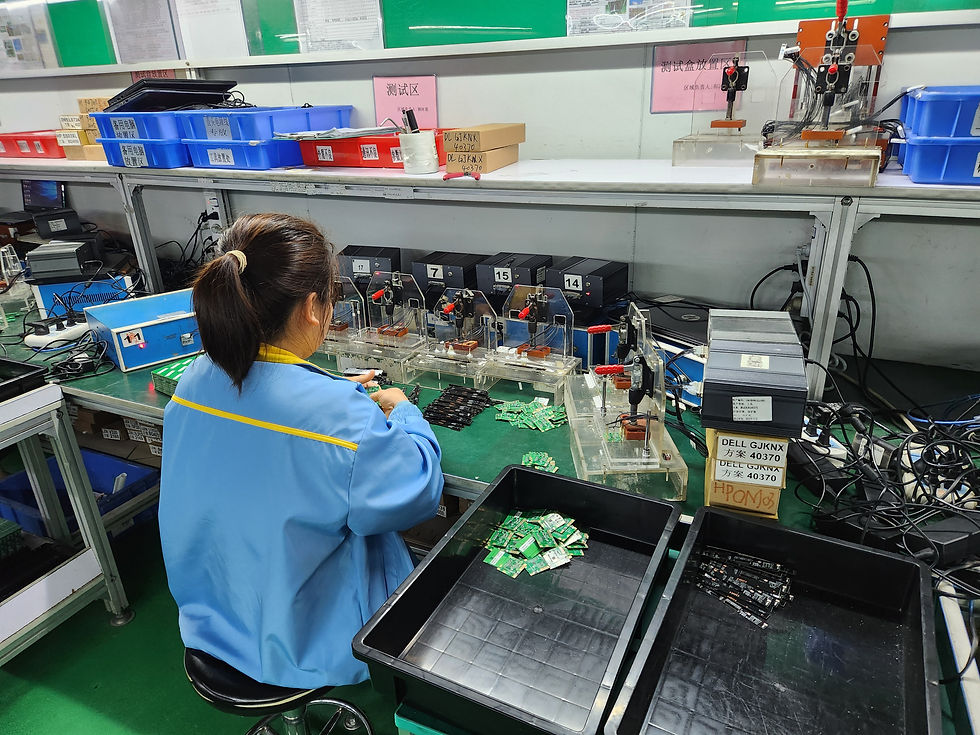
5. Precision Assembly
Always remember that test jigs work best when they are reliable - this is a precision design, and deviations/tolerances can cause intermittent failures!
Carefully align pogo pins and allow additional space; misalignment often causes intermittent test failures.
Neatly route cables and headers to reduce stress during testing.
Include a systematic approach to assembly, such as step-by-step checkpoints to avoid missing critical details.
6. Calibration and Testing
Carefully check pogo pin compression and electrical connections. Skipping thorough checks can lead to unreliable results.
Develop a calibration protocol to ensure repeatability and accuracy across multiple test runs.
Record calibration results systematically for future reference and troubleshooting.
7. Troubleshooting Common Issues
Pin misalignment, worn pins, and intermittent contact are common issues. We share effective solutions for these issues.
Maintain a troubleshooting log to reference past solutions and streamline future testing processes quickly.
Think about test jigs as a template - not for this product or PCBA, but for all of your products! We have test jig templates, as the same learnings can be used for future test jigs.
If it's your first time, don't be discouraged! Making a testing jig is like designing a new product, so if it's your first time, there will be a lot of learning!
Give yourself enough time. Test jigs are often forgotten until a few weeks before production! Test jig considerations should occur as early as EVT or DVT!
Choosing Between In-Circuit Test (ICT) and Functional Test (FCT)
ICT or FCT? Our Practical Approach
We've often faced the question of whether to use ICT or FCT in our projects. Here’s our straightforward breakdown based on our experience.
Quick Definitions
ICT: Quickly tests individual components on mass-produced PCBs.
FCT: Checks the overall function of your PCB under operating conditions.

Comparison Based on Projects
Criteria | ICT | FCT |
Scope | Individual components | Entire PCB |
Speed | Faster | Moderate |
Initial Cost | Higher | Lower |
Complexity | High setup, easy maintenance | Moderate setup and maintenance |
Ideal Usage | High-volume production | Prototypes or low volume |
Decision Flowchart
Are you testing high volumes (thousands or more)?
Yes ➡️ Choose ICT
No ➡️ Continue to next step
Is your focus primarily on individual component faults?
Yes ➡️ Choose ICT
No ➡️ Choose FCT
Benefits of Hybrid Testing
Using both ICT and FCT together can greatly improve testing efficiency. We have found this approach highly effective.
Pogo Pin Jig Design – Beginner's Guide
Why Pogo Pins are Important
Pogo pins may look simple, but selecting and using them correctly greatly impacts PCB testing reliability. We learned this through trial and error.
Essential Pogo Pin Design Tips
Choose pogo pins carefully based on your application and requirements.
Alignment is critical; even slight misalignments can significantly affect test accuracy.
Select durable materials, such as anodised aluminium, for jig bases to minimise maintenance.
Important Electrical and Mechanical Advice
Ensure good grounding and impedance management. Ignoring this has caused testing issues in our projects.
Develop reliable compression mechanisms and thoroughly test them.
Routine Maintenance and Sustainability
Clean test pins and contact points regularly to prevent the buildup of debris that can interfere with signals.
Check pogo pins for wear or reduced spring force and replace any that feel loose or do not spring back fully.
Tighten any mounting screws or alignment posts to ensure mechanical stability over time.
Document maintenance dates and any component replacements to keep track of the jig condition.
Store your test jig in a dry, dust-free container to extend its usable life.

Practical Troubleshooting Tips
If pogo pins are not making consistent contact, check for debris on the test points or worn-out springs in the pins.
For intermittent readings, inspect solder joints on the headers and make sure there is even compression across all pins.
If the jig does not align correctly with the board, verify that your CAD file matches the actual board dimensions.
When certain pins consistently fail, swap their positions with working pins to determine if the issue is mechanical or electrical.
Keep a logbook or simple spreadsheet to record frequent problems and how they were resolved. This helps speed up troubleshooting over time.
Conclusion
Creating your PCB test jig is a valuable skill that ensures high-quality and reliable electronic products. Following these guidelines can simplify your testing process, reduce errors, and improve overall efficiency. Always remember, careful planning and regular maintenance go a long way.
FAQs
What materials are best for PCB jig bases?
Durable materials like acrylic and anodised aluminium are recommended due to their strength and minimal wear over time.
How do I choose between ICT and FCT?
Consider your testing scope, volume, budget, and complexity. ICT is ideal for high-volume testing of components, while FCT is better for prototype or low-volume, full-functionality tests.
How can I prolong the lifespan of my test jig?
Routine checks, proper alignment, careful maintenance, and using durable materials are the most effective ways to prolong jig lifespan.
We'd love to hear your experiences and challenges in the comments below. Let's share our knowledge and support each other in the community.

Comments